Amazon PPC Audit Tool —
Find Exactly Where Your Amazon Ad Budget Is Wasted.
Upload your Amazon Search Term Report CSV. AdLeak Fixer classifies every search term as KILL, REDUCE, or KEEP — based on your ACOS target and spend thresholds. Prioritized action plan in under 60 seconds. No subscription, no installation, 100% offline.
Free Amazon Ad Waste Check
Upload your Search Term Report and see exactly how much you're wasting — in seconds, right in your browser. Your file is never uploaded, stored, or sent anywhere.
Drop your Amazon Search Term Report CSV here
or
Export it from the Amazon Advertising console as a CSV.
100% offline after first load. No accounts. No subscription. No data ever leaves your device — not your CSV, not your search terms, not your numbers. Verified.
The Problem
Your Amazon ad budget is leaking — and you probably don't know exactly where.
Every Amazon seller with active Sponsored Products campaigns deals with wasted ad spend. The Search Term Report contains the data you need — but manually sifting through hundreds of rows to find inefficient Amazon ads takes hours, and it's easy to miss the real culprits.
Search terms burning budget with zero orders
You have terms that have spent $30, $50, even $100 — and produced not a single sale. They keep running because nobody checked. That money is gone.
ACOS looks fine on paper — but some terms are killing your margins
Your campaign average ACOS might look acceptable, but hidden inside are terms running at 150% or 200% ACOS. They drag up your costs and drag down your profitability every day.
Amazon search term analysis takes hours to do manually
Sorting, filtering, cross-referencing ACOS per term, deciding what to pause — on a real campaign with hundreds of search terms, this takes hours every week. Most sellers skip it entirely, and the waste silently compounds.
You don't know which terms are actually worth keeping
Without a clear decision framework, pausing decisions become guesswork. Poor search term performance goes unchecked because there's no reliable threshold for "pause this now" vs. "wait for more data."
Warning Signs
Signs Your Amazon PPC Campaign Is Wasting Money
Wasted ad spend on Amazon rarely announces itself. It builds up quietly in your Search Term Report while your campaign dashboard looks fine.
- High clicks, zero orders on multiple terms. If several search terms in your report have 20, 30, 50+ clicks with no conversions, those terms are costing you money on every click. They will not self-correct.
- Your average ACOS looks acceptable, but margins feel wrong. Campaign ACOS averages hide individual disasters. Three strong terms can carry an average while 15 others silently burn budget at 150%+ ACOS.
- Ad spend is rising but revenue isn't keeping up. When spend scales faster than sales, the extra budget is going into non-converting search terms — not into more sales from your best terms.
- You're running mostly broad match keywords without weekly negatives. Broad match generates the most irrelevant search queries. Without a weekly review and negative keyword additions, it leaks continuously.
- You haven't reviewed your Search Term Report in the last 2 weeks. Every week without a review is another week of confirmed waste running uninterrupted. Two weeks of inaction can easily mean $50–$200 in avoidable losses on an active account.
- You can't name your top 3 converting search terms right now. If you don't know which terms are actually making you money, you don't have control over where your budget is going — or why your ACOS is what it is.
- Your ACOS target and actual ACOS are persistently misaligned. A consistent gap between target and actual usually means a small number of high-waste terms are dragging the average up every week — and haven't been paused yet.
If clicks cost money and don't convert, the listing is the leak — not the ad. No-Sale Detector diagnoses exactly why paid traffic doesn't convert so you fix the page, not just the bid.
The Guide
How Amazon PPC Optimization Works
Understanding the mechanics behind Amazon advertising is the first step to stopping wasted ad spend for good.
Before cutting bids, make sure organic is pulling its weight. If you rely on PPC because organic ranking is broken, fix the root first — Rank Blocker diagnoses which keywords are structurally blocked so you stop paying for visibility you should own for free.
Amazon PPC optimization is not about adding more keywords
Most sellers focus on what to add to their campaigns — more keywords, more ad groups, higher bids. The faster path to lower ACOS is removing what's costing you money. In a typical active account, 15–25% of search terms in the Search Term Report are generating spend with no return. Finding and eliminating those terms is where the real gains are.
The Search Term Report is your primary diagnostic tool
The Search Term Report (Seller Central → Reports → Advertising Reports → Search Term) shows every search query that triggered your ads — not just the keywords you bid on, but the actual phrases shoppers typed before clicking. Each row shows spend, clicks, orders, and ACOS for that specific query.
This is the only place where wasted ad spend becomes visible. A keyword like "yoga mat" looks fine in your campaign settings. But inside the Search Term Report, you'll find it's triggering searches like "yoga mat store near me" or "free yoga mat" — which never convert, but cost you per click every time. Your Amazon PPC audit lives in this report.
Why waste accumulates and doesn't stop on its own
Amazon doesn't pause non-converting search terms automatically. A term that has spent $80 with zero orders will keep running at full bid indefinitely unless you intervene. Most wasted ad spend isn't a one-time event — it compounds week over week on the same terms, in the same campaigns, until someone reviews the report and makes the call.
- Broad match keywords triggering off-target, low-intent search queries
- Auto campaigns matching to completely unrelated product categories
- Terms that had one early order, set a low ACOS benchmark, and never converted again
- High-ACOS terms converting occasionally but eroding margin on every order
- No defined rule for when to pause a term vs. reduce its bid vs. wait longer
What effective Amazon search term analysis looks like in practice
A weekly Amazon PPC audit takes 15–20 minutes if you have a repeatable process. Pull the last 30 days of your Search Term Report. Sort by spend. Apply three filters in order: zero orders above your waste threshold (pause), orders with ACOS above target (reduce bid), orders with ACOS at or below target (keep). That process — applied every week — is what moves ACOS down over time. The challenge is doing it consistently without spending an hour in a spreadsheet every time.
Step-by-Step
How to Analyze Amazon Search Terms
A practical framework for identifying non-converting keywords, evaluating ACOS, and making confident pause and bid decisions.
Start with zero-order terms above your waste threshold
Open your Search Term Report, sort by Spend descending. For every term above your waste threshold — say $15 — check the Orders column. Any term with $15+ in spend and zero orders is confirmed waste. There is no nuance here: the money is gone, the term never converted, and it will keep running at the same rate unless you stop it. Pause it and add it as a negative keyword immediately. Work through the full list before touching anything else.
Analyze ACOS at the term level, not the campaign level
Campaign ACOS is an average — and averages hide problems. Once you've removed zero-order terms, look at each remaining term individually. Compare its ACOS to your target (your break-even ACOS, typically 20–35% depending on margins). Separate two groups:
- Terms converting above your target ACOS with enough data (5+ clicks, meaningful spend) → bid reduction candidates
- Terms converting at or below your target ACOS → confirmed performers, leave them alone
Pause when: spend ≥ threshold AND orders = 0
This is the only rule you need for pausing. If a term has spent at or beyond your waste threshold and has generated zero orders, pause it — regardless of how relevant it looks. "Relevant" doesn't pay the bills. Actual orders do. Set your waste threshold at an amount that genuinely hurts: $10–$25 for most products, higher for high-AOV items. Don't move the goalposts mid-analysis. Apply the rule consistently.
Lower bids using a formula, not a guess
When a term converts but ACOS is above your target, calculate the new bid directly: New bid = (Current bid × Target ACOS) ÷ Actual ACOS. Example: target 30%, actual ACOS 55%, current bid $1.20 → new bid = (1.20 × 30) ÷ 55 = $0.65. Apply the new bid and give it 2–3 weeks of data before evaluating again. Don't guess — the math tells you exactly where the bid needs to be to hit your margin target.
Worked Example
How to Spot Wasted Spend in an Amazon Search Term Report
Three terms from the same campaign. Same 30-day report. Target ACOS: 30%. Three completely different actions required.
AdLeak Fixer runs this classification automatically across every term in your report — ranked by wasted spend, with the biggest fix always shown first.
Common Mistakes
Amazon PPC Mistakes That Waste Your Budget
Most Amazon ad waste comes from a small set of repeated, avoidable mistakes. Here's what to watch for.
1. Running broad match without weekly negative keyword additions
Broad match is the fastest way to accumulate irrelevant search terms. Amazon matches your broad keyword to anything loosely related — including competitor brand names, unrelated categories, and zero-intent queries. Each irrelevant click costs real money. Without weekly negative keyword additions from your Search Term Report, broad match campaigns bleed continuously.
Fix: Every week, pull your Search Term Report, filter for broad match terms, and add every irrelevant query as a negative. It takes 10 minutes and stops the same waste from recurring next week.
2. Never reviewing the Search Term Report
The most expensive mistake on this list. Sellers who check their campaign dashboard regularly but never open the Search Term Report have no idea which specific search queries are converting — and which are burning their budget. The dashboard shows you averages. The Search Term Report shows you reality. These are often very different.
Fix: Open your Search Term Report at least once a week. Sort by Spend. The top 10 rows by spend contain 80% of the actionable data. You don't need to review every row every week — you need to review the expensive ones.
3. Giving non-converting terms unlimited time
There's no rule that says a term with $60 in spend and zero orders deserves more time. Some sellers keep extending the window — "let's give it another week" — indefinitely. A term that hasn't converted after spending 3–4× your average order value is not going to convert. It's a structural mismatch between the search query and your product.
Fix: Set a hard rule before you start: if a term has spent [your waste threshold] with zero orders, it gets paused. Apply it consistently. Pause decisions shouldn't require debate every time.
4. Treating Amazon PPC optimization as a one-time task
A single cleanup session removes the current waste — but doesn't prevent future waste. New search terms enter your campaigns constantly as Amazon's algorithm tests new match expansions. A campaign that was clean two weeks ago can accumulate significant wasted spend in the interim. Without a recurring cadence, you're always playing catch-up.
Fix: Schedule a recurring 20-minute review every 7–14 days. Run AdLeak Fixer on the latest 30-day report. Act on the KILL list. Lower bids on REDUCE terms. The process gets faster each week as the obvious waste disappears.
The Tool
Upload your Search Term Report. Get your Amazon PPC audit in 60 seconds.
AdLeak Fixer runs entirely in your browser — no installation, no account, no data sent anywhere. Open it, upload your CSV, set your ACOS target, and get a prioritized list of exactly what to fix and in what order.
Download your Search Term Report from Amazon as a CSV
In Seller Central go to Reports → Advertising Reports, select report type "Search Term", pick your date range (last 30–60 days recommended), and click Download. You will receive a .csv file — that is the file AdLeak Fixer needs.
Open AdLeak Fixer in your browser
No installation required. Download the ZIP, unzip it, and open index.html in Chrome, Firefox, Edge, or Safari. It works completely offline from this point.
Set your ACOS target and spend thresholds
Choose a preset (Conservative, Balanced, or Aggressive) or enter your own numbers. Your target ACOS and waste threshold determine what gets flagged. Takes 10 seconds.
Upload your Search Term Report CSV and click Analyze
Drag and drop your .csv file onto the upload area, or click "browse for file". AdLeak Fixer reads the file entirely in your browser, aggregates every row by search term, and classifies each one against your settings. Results appear in seconds — no waiting, no upload progress bar.
Act on your prioritized action plan
You get a ranked list of terms to pause immediately, terms to reduce bids on, and terms to keep running. Export to CSV and make the changes directly in Amazon Ads. Done.
See It In Action
AdLeak Fixer Amazon PPC Audit — What Your Results Look Like
This is what AdLeak Fixer looks like when you use it. Upload your CSV and get a prioritized action plan within seconds.
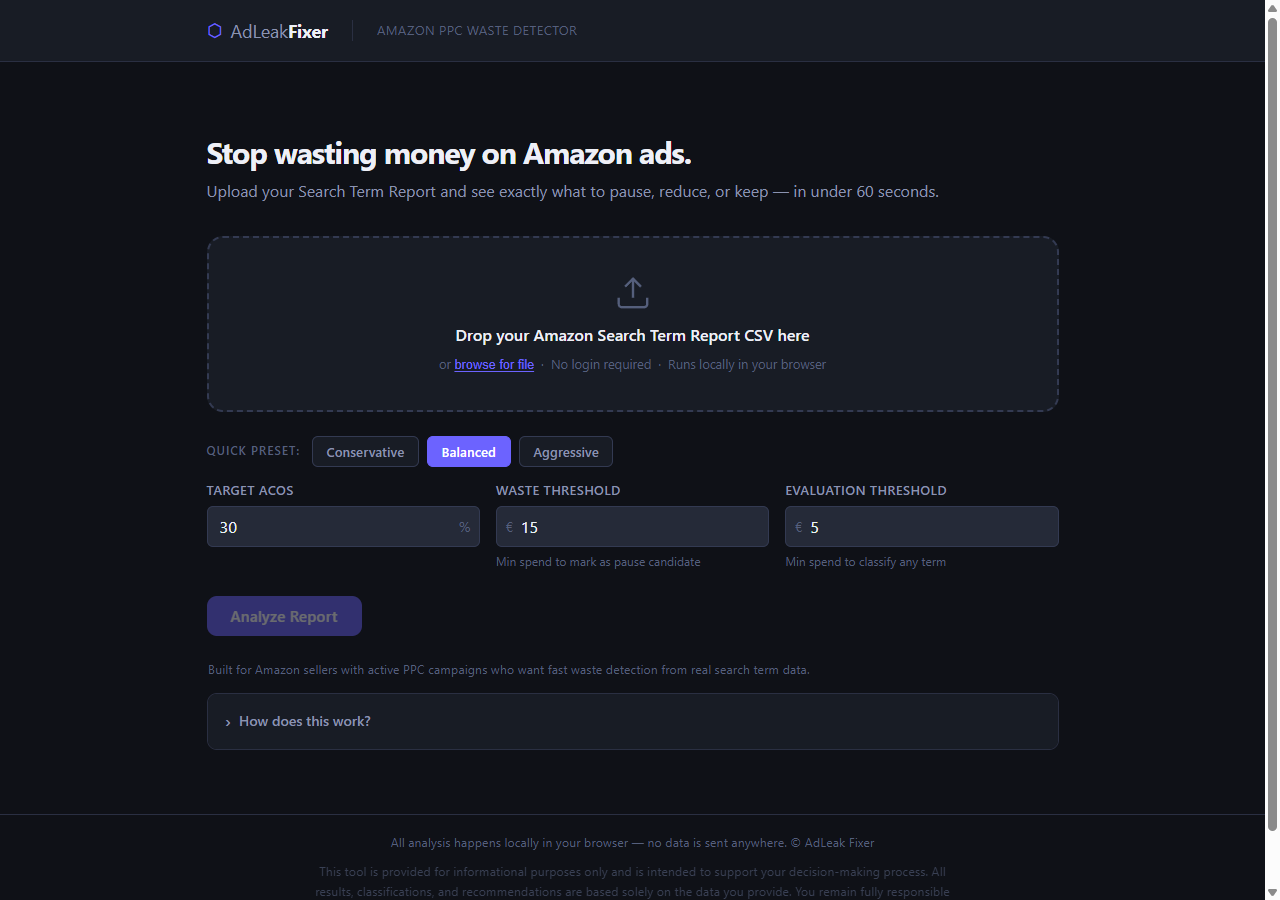
Upload screen — drop your CSV, set your ACOS target, click Analyze
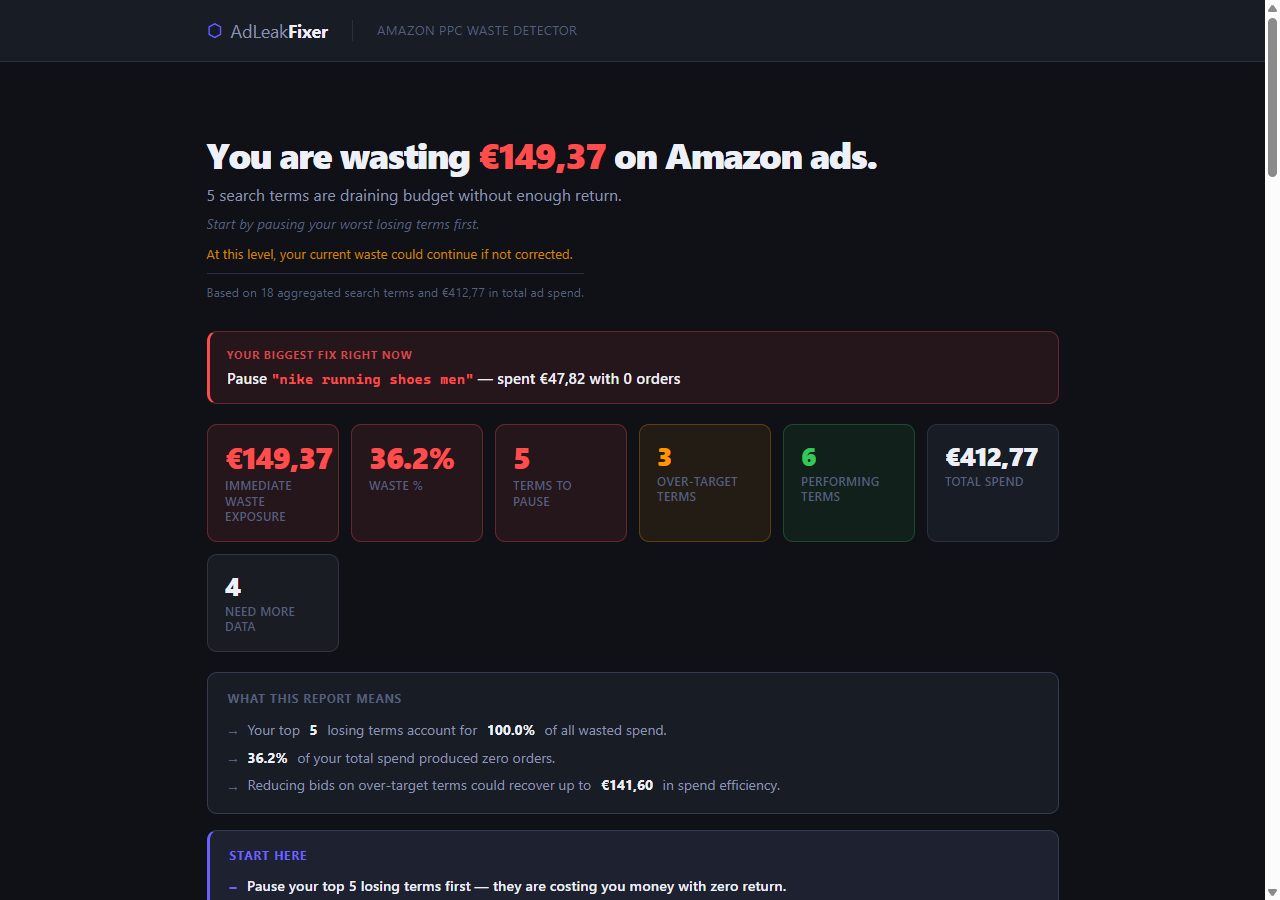
Results dashboard — instant waste total, biggest fix callout, full summary

Action list — every term ranked by wasted spend with PAUSE IMMEDIATELY labels
Click any screenshot to view full size
What You Get
How AdLeak Fixer Classifies Every Amazon Search Term
No ambiguity. No gray areas. Every term in your report is classified into one of four categories — with a reason and a recommended action.
Pause immediately
This term spent past your waste threshold and produced zero orders. Every day it runs is money thrown away. Pause it now in Amazon Ads.
Lower the bid
This term converts but your ACOS is above your target. It's not a waste — it just needs a lower bid to become profitable. Reduce and monitor.
Leave it running
This term is performing within your ACOS target. It's working. Don't touch it. These are your winners — scale them if budget allows.
Wait before deciding
This term hasn't accumulated enough spend to classify reliably. Making a decision now would be premature. Leave it and check again in 2–4 weeks.
Features
Amazon PPC Audit Tool Features — What's Included
AdLeak Fixer is a focused tool. It does one job and does it well.
- Instant classification: KILL, REDUCE, KEEP, NOT ENOUGH DATA
- Your biggest fix right now — always shown first
- Biggest money leaks ranked by wasted spend
- ACOS-based bid optimization per term
- Waste concentration insight (where your losses are concentrated)
- Three presets: Conservative, Balanced, Aggressive
- Custom ACOS target and spend thresholds
- Export full results to CSV with action labels
- Supports comma and tab-separated reports
- Works with all Amazon column name formats and regions
- Multi-campaign reports aggregated automatically
- 100% offline — no data ever leaves your browser
- No installation, no login, no subscription
- Works on Windows, Mac, and Linux
Who It's For
Built for sellers who manage their own PPC.
AdLeak Fixer is for anyone running Amazon Sponsored Products who wants fast, honest, data-backed decisions without paying for an agency or subscribing to expensive software.
- Amazon FBA sellers running Sponsored Products campaigns
- Private label sellers managing their own ads without an agency
- Brand owners who want to stop overpaying for non-converting clicks
- Freelance Amazon PPC managers who audit client accounts
- Sellers scaling up who want a repeatable weekly waste-check process
- Anyone who has ever looked at their ACOS and thought "something is off"
FAQ
Amazon PPC Audit Tool — Frequently Asked Questions
Do I need to install anything?
Is my Amazon data safe? Will it be uploaded anywhere?
Which Amazon report do I need to download?
Does it work with multiple campaigns in one CSV?
What ACOS target and thresholds should I use?
Does it work with both auto and manual campaigns?
Is this a one-time purchase or a subscription?
How often should I analyze my Amazon search terms?
What is Amazon PPC optimization?
How do I reduce wasted ad spend on Amazon?
What is a good ACOS on Amazon?
What is an Amazon PPC audit?
Is AdLeak Fixer an offline Amazon PPC tool — does it work without internet?
Does AdLeak Fixer work for Amazon FBA sellers running Sponsored Products?
How is AdLeak Fixer different from analyzing my Search Term Report in a spreadsheet?
Stop letting wasted ad spend eat your margins.
AdLeak Fixer is the fastest way to run an Amazon PPC audit. Upload your Search Term Report, know exactly what to fix — in under 60 seconds.
Get AdLeak Fixer →One-time purchase · No subscription · 100% offline · Works in any browser